
Skip to content

Balloon Drawings and Complete AS9102 FAI Reports, Without Leaving Your Browser

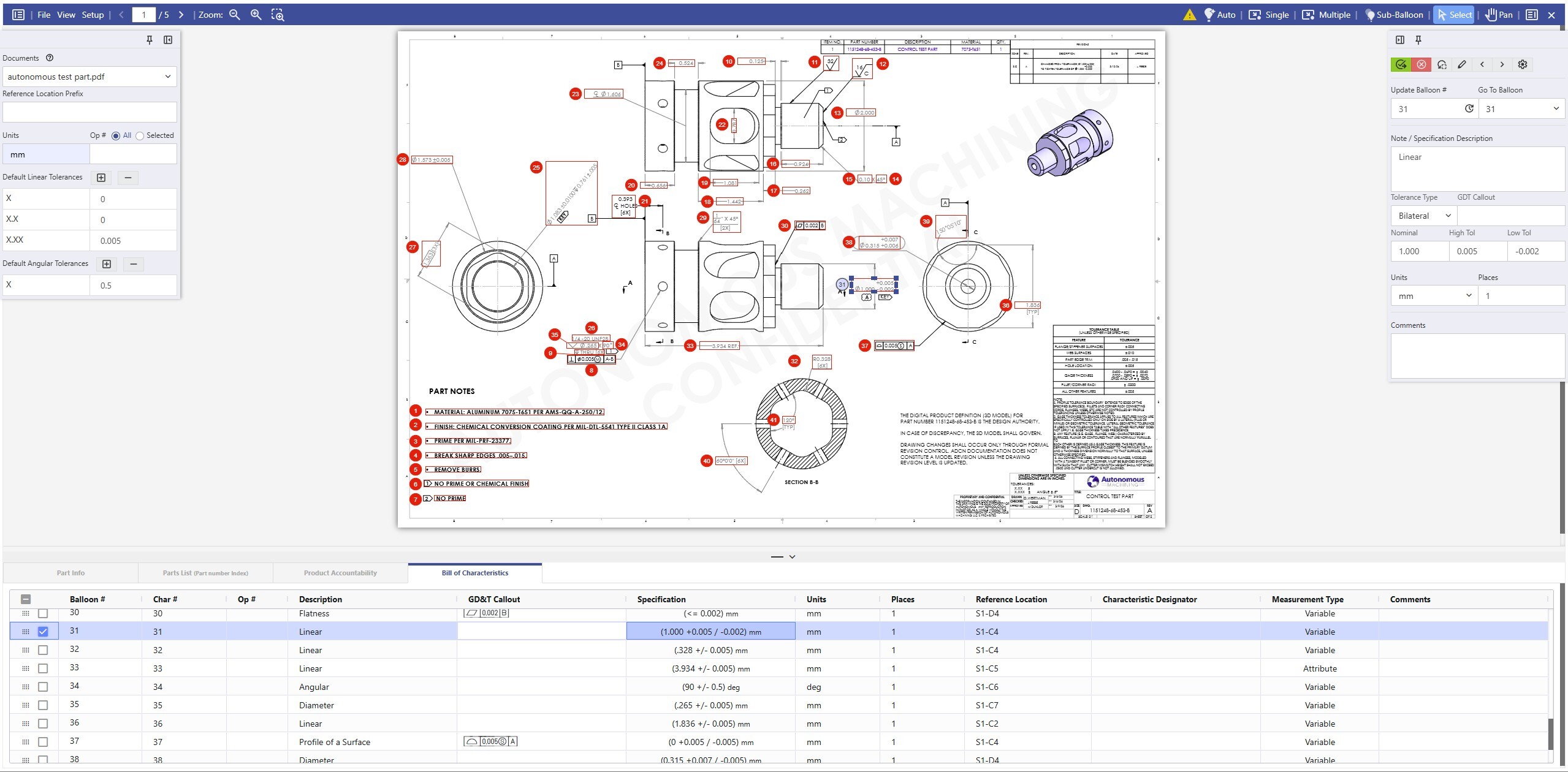
Identifying and documenting dimensions and GD&T characteristics is the most time-consuming step in First Article Inspection. Net-Inspect's Balloon Tool automates that step with purpose-built engineering OCR, then populates AS9102 Forms 1, 2, and 3 with one click, all inside your existing FAI workflow.
Net-Inspect Balloon Tool

From Drawing to FAI Report
in Minutes, Not Days

Identifying and documenting dimensions and GD&T characteristics is the most time-consuming step in First Article Inspection. Net-Inspect's Balloon Tool automates that step with purpose-built engineering OCR, then populates AS9102 Forms 1, 2, and 3 with one click, all inside your existing FAI workflow.
 
0+ yrs
of AS9102 expertise built in
0+
Active Users
0M+
FAI Reports
0M+
Measurements Tracked
0
Countries Supported
THE Problem

Ballooning Is Your FAI Bottleneck & Re-Keying the Data Is What Makes It Worse

A single drawing with 250–500 dimensions can take a quality engineer 2–8 hours to balloon manually. But the real cost isn't the annotation time. It's everything that happens next: data re-entry, version drift, rejected FAIRs, and suppliers re-ballooning the same drawing from scratch.

Save time with Net-Inspect Balloon Tool
Time per drawing before vs. after
2–8 hours
Manual ballooning with standalone or desktop tools
 
With Net-Inspect
Minutes
Intelligent auto-balloon with 1-click Form population
 
For a drawing with 312 characteristics, that savings compounds across every FAIR your team creates and every subsequent drawing revision, compounding at every tier of your supply chain. 

How It Works

From Drawing Upload to Completed FAIR in Four Steps

Everything stays inside your Net-Inspect FAI workflow. No separate software. No additional browser tabs. No exports.

1

Upload Engineering Drawings

Upload one or multiple 2D PDF drawings directly to your FAIR. Switch between PDFs using the document selector without leaving the tool.

2

Auto-Balloon Characteristics

Purpose-built OCR detects dimensions, GD&T frames, notes, and callouts. Auto-adjusting placement avoids collisions. Balloon selected pages or full documents.

3

Refine and Validate

Add sub-balloons, leader lines, and copy-paste balloons for complex assemblies. Built-in validation flags Form 3 errors before saving, including visual warnings per characteristic.

4

Populate, Submit, Distribute

One click populates AS9102 Forms 1, 2, and 3. Submit the completed FAIR to your customer, or distribute ballooned drawings to suppliers for their own FAI submissions.

Built for Every Part of the Process

The Capabilities That Close the Gap Between Ballooning and FAIR Approval

Purpose-built for AS9102 FAI workflows. Refined through active customer partnerships and over 25 years of application expertise.
Integrated FAI Workflow
AS9102 Form1 Form2 Form3

From Drawing to FAIR, Without Leaving Net-Inspect

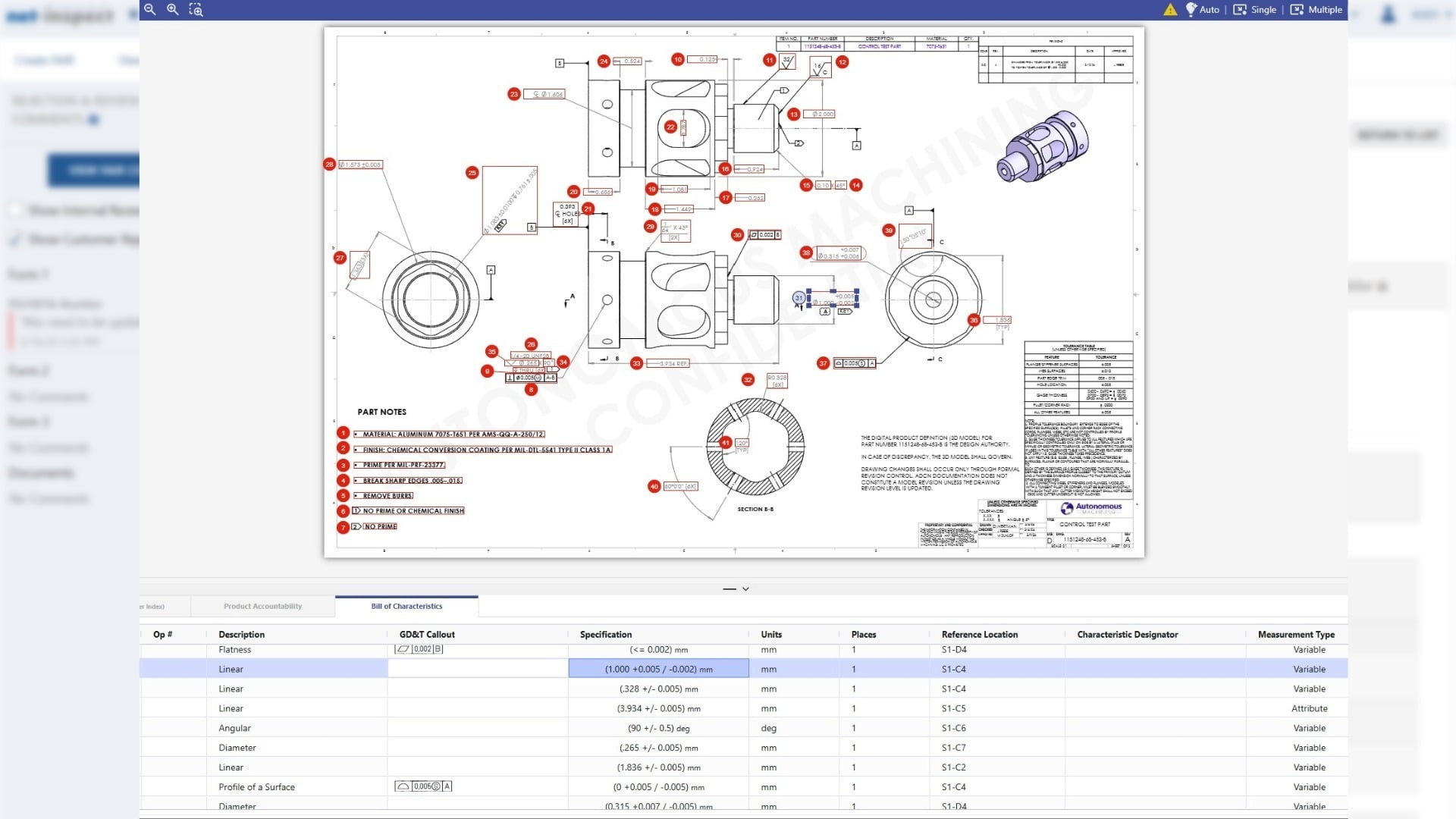
Every standalone ballooning tool creates the same downstream problem: you still need to move the data into your FAI system. Net-Inspect eliminates that step entirely. Ballooning and FAI documentation live in one platform, and data flows between them automatically.

  • One-click population of AS9102 Forms 1, 2, and 3 directly from completed balloon annotations
  • Real-time synchronization between ballooned drawings and FAIR data throughout the quality workflow
  • Submit completed FAIRs to customers for buy-off — all within the same platform your team already uses
Zero Exports, re-entries, or tool switches between ballooning and FAIR submission
Supply Chain Integration
Multi-Tier Supply Chain Digital Thread

Standardize Balloon Methodology Across Your Entire Supply Chain

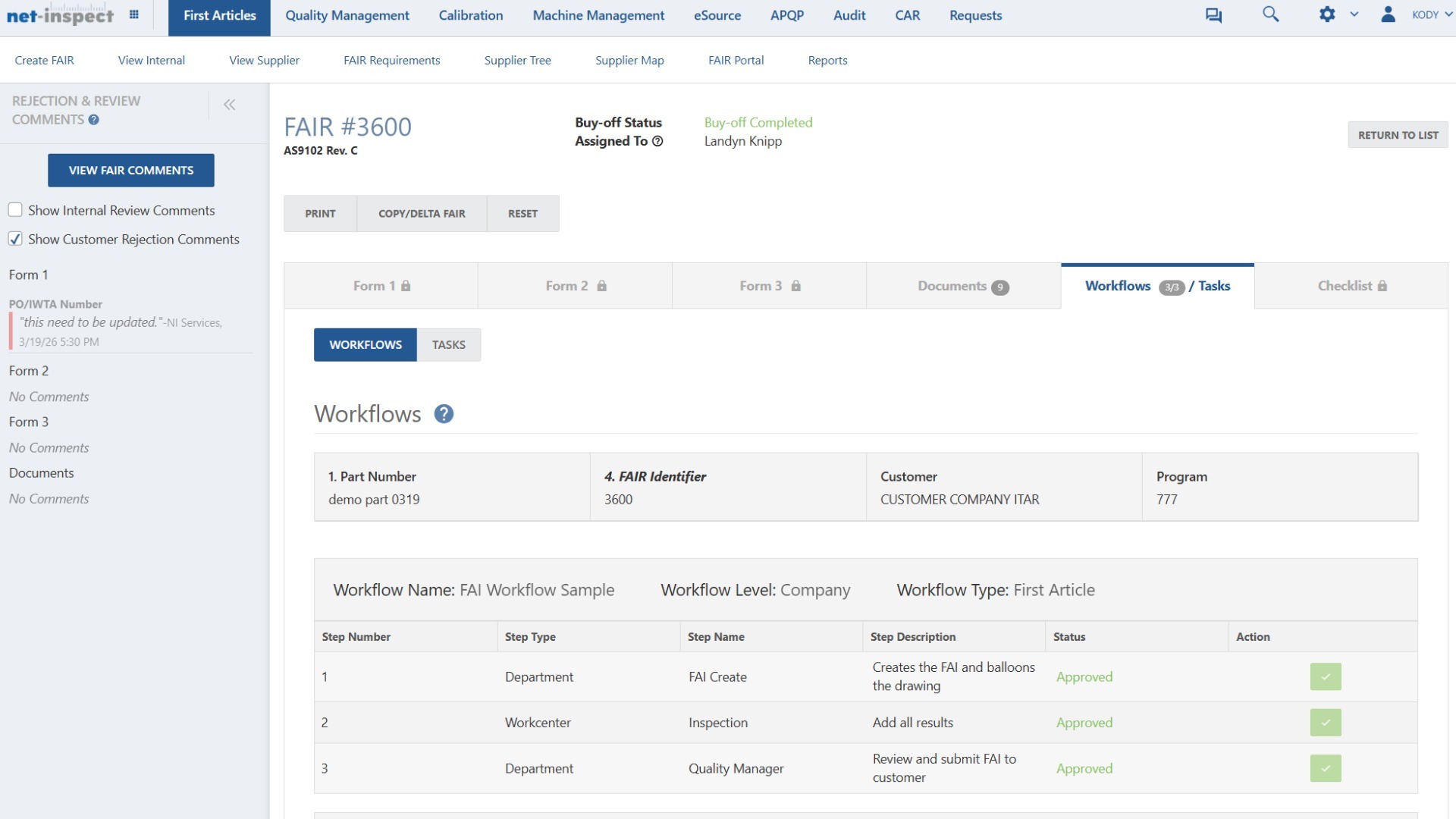
Copy ballooned documents directly to suppliers. They submit their FAI Reports using the same balloon numbering, on the same platform — no re-ballooning required. When you adjust balloon numbers, cross-document renumbering keeps all related documents synchronized automatically.

  • Copy ballooned drawings directly to sub-tier suppliers for consistent, standardized FAI submissions
  • Cross-document renumbering: balloon adjustments update all linked documents automatically upon save
  • Multi-tier visibility as ballooned requirements cascade down the supply chain in a secure environment
200+ Supplier tiers connectable on a single secure platform — no per-seat licensing
Built-In Validation
Quality Validation Error Prevenetion

Catch Errors Before Your Customer Does

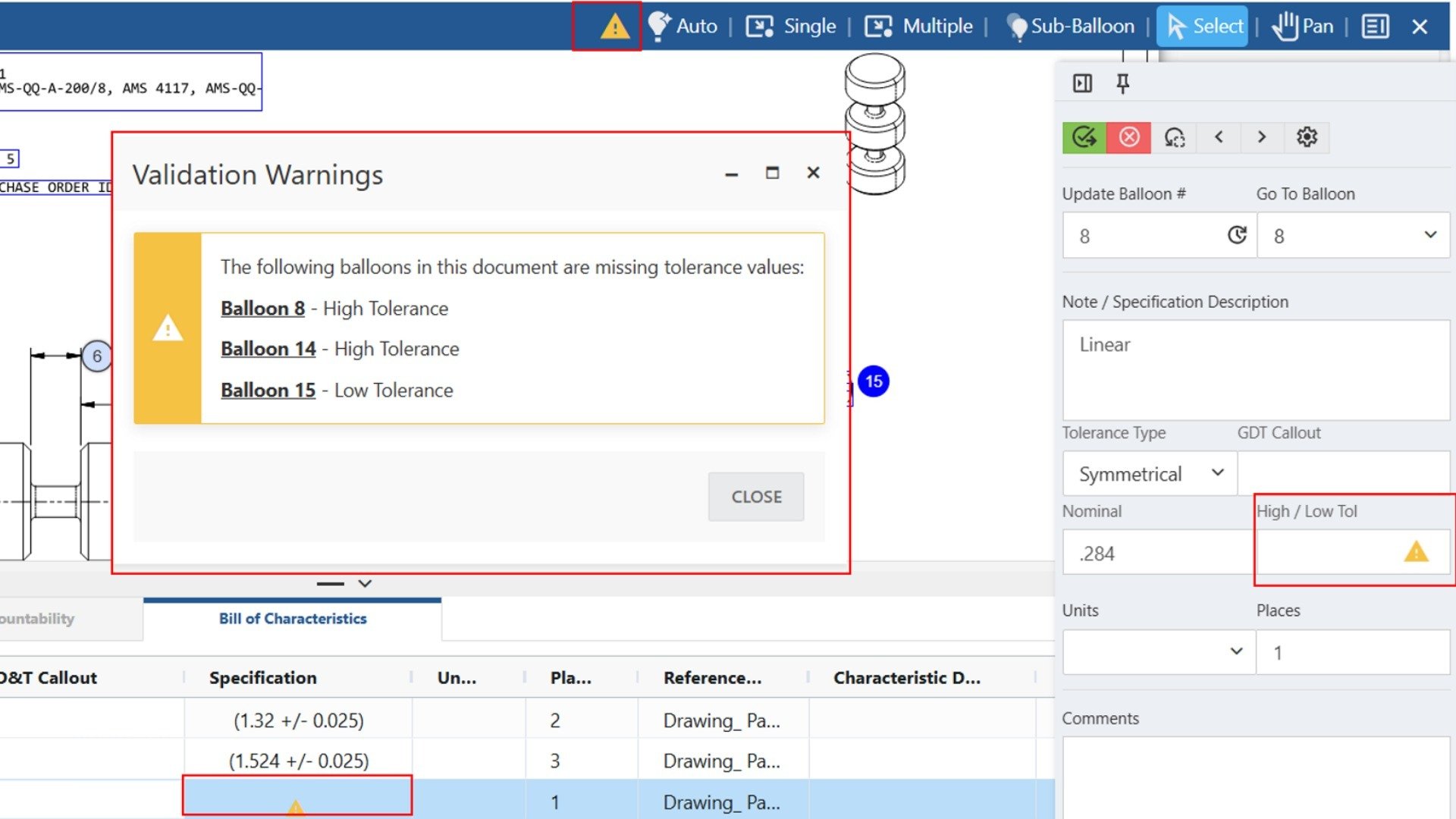
Visual validation warnings appear in real-time as your team works. Missing tolerances, incomplete specifications, and Form 3 errors are flagged before you save — not after the customer rejects the FAIR. The system catches what humans miss.

  • Yellow triangle indicators flag missing specification data on individual characteristics in the Bill of Characteristics grid
  • Validation summary lists every affected balloon number and the specific field that requires attention
  • Affected fields are highlighted in the right panel for immediate, precise identification and correction
Fewer FAIR rejections from incomplete or missing Form 3 data — caught before submission
Advanced Drawing Annotation
GD&T Sub-Balloons OCR Multi-Document

Purpose-Built OCR for Aerospace Engineering Drawings

Not every drawing is straightforward. Net-Inspect handles bi-lateral and unilateral tolerances, GD&T symbols, quantity-based callouts (e.g., 4X Ø.250), and complex sub-assembly hierarchies that general-purpose tools miss. Precision units including µin and µm are fully supported.

  • Sub-balloon and sub-sub-balloon support for complex assemblies, with leader lines associating balloons to drawing features
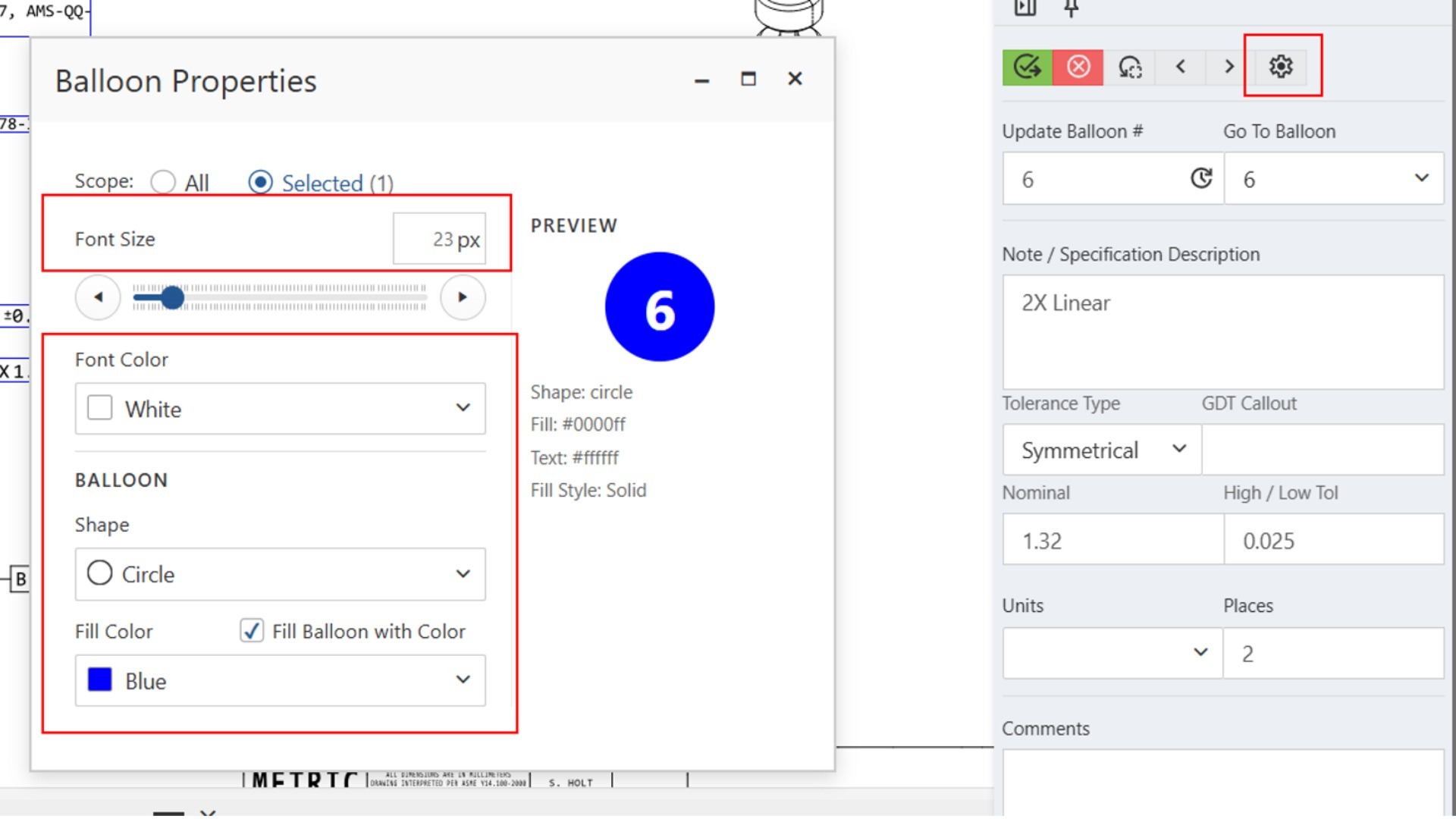
  • Customizable balloon properties: shape, fill color, font color, and size — for compliance-specific color-coding workflows
  • Multi-document upload: balloon primary drawings and supplemental specification documents in a single FAIR

1-Click Population of AS9102 Forms 1, 2, and 3 from completed balloons — however complex the drawing
The Integration Advantage

What Happens After Ballooning Matters

Standalone tools answer "can you balloon a drawing?" Net-Inspect answers what comes next: supplier submission, customer buy-off, and audit-ready documentation. All done in one platform, with no tool switching required.

Upload PDF engineering drawing Auto-balloon characteristics Refine sub-balloons and validate Populate AS9102 Forms 1, 2 & 3 Enter measurements and results Submit FAIR to customer for buy-off Distribute ballooned docs to suppliers
WHY NET-INSPECT

The Only Ballooning Tool Built Into Your FAI Platform

Feature depth matters. But so does what comes after ballooning. Net-Inspect is the only platform where ballooning, FAI documentation, supplier collaboration, and supply chain quality management exist in one workflow.

Feature Comparison Net-Inspect Balloon Tool Integrated platform Balloonist.io or GroundControl SaaS point solution DISCUS / IPI Legacy desktop HighQA or 1Factory QMS with ballooning
Auto-balloon from 2D PDF drawings
Sub-balloon and hierarchy support e.g., 1.1, 1.1.1 for complex assemblies Partial Partial
AS9102 Form 3 auto-population
AS9102 Forms 1 and 2 auto-population Partial Partial
Integrated FAI Report creation and submission No export to separate system required
Supply chain distribution of ballooned documents Copy to suppliers, standardize methodology across tiers Partial
Multi-tier supplier collaboration on one platform Partial
Browser-based access, zero installation
FedRAMP Moderate Equivalency security Validated annually by independent 3PAO
Built-in ITAR/EAR export controls Partial
No per-seat licensing limits
Built-in Form 3 validation before saving Partial Partial
Boeing logo, All Rights Reserved
Bombardier Aerospace logo, All Rights Reserved
Parker Aerospace logo, All Rights Reserved
Rolls-Royce Aerospace logo, All Rights Reserved
Safran Aerospace logo, All Rights Reserved
SpaceX logo, All Rights Reserved
Honeywell Aerospace logo, All Rights Reserved
Raytheon, An RTX Business logo, All Rights Reserved
Ontic logo, All Rights Reserved
GE Aerospace Logo, All Rights Reserved
Common Questions

What Teams Ask Before Getting Started

Answers to the questions quality teams and supply chain managers ask most often.

Do our sub-tier suppliers need separate licenses to receive ballooned documents?

No. There are no per-seat licensing limits on the Net-Inspect platform. If your suppliers already use Net-Inspect for FAI submissions, they can receive and work with ballooned documents immediately. If they are new to the platform, onboarding is straightforward — many suppliers are already active.
Does the Balloon Tool replace our current FAI process or work alongside it?
 
It works inside your existing Net-Inspect FAI workflow, not alongside it. The Balloon Tool is integrated directly into the FAI module — your team balloons the drawing and Form 3 populates from within the same session. If you are new to Net-Inspect, a demo will show the complete workflow from drawing upload through FAIR submission.
We already use a desktop ballooning tool. What changes if we switch?
 
The primary change is elimination of the export and re-entry step. With desktop tools, data moves from the ballooning software to your FAI system by hand. With Net-Inspect, ballooning and documentation are the same step. You also gain supply chain distribution, built-in validation, and FedRAMP Moderate Equivalency security that standalone tools cannot provide.
How does the Balloon Tool handle drawings with hundreds of characteristics?
 
The purpose-built engineering OCR is designed for high-characteristic-count aerospace drawings. It handles bi-lateral and unilateral tolerances, GD&T symbols, quantity-based callouts, and grid zone locations. You can balloon selected pages or page ranges for targeted processing, and sub-balloon hierarchies support complex assembly structures.
What security certifications does Net-Inspect hold for defense programs?
 
Net-Inspect is hosted on Microsoft Azure Government and is assessed annually by an independent third-party assessor (3PAO) for FedRAMP Moderate Equivalency. Built-in ITAR/EAR export controls include export banners, user location tracking, access logging, and role-based data visibility — all configurable at the part level.
Can existing Net-Inspect customers access the Balloon Tool?
 
Yes. The Balloon Tool is part of the Net-Inspect FAI module. If you are a current customer and do not see it in your workflow, contact your account manager. For new customers, the Balloon Tool is available as part of the full Net-Inspect platform — request a demo to see it in context with your specific FAI requirements.
Ready to See Ballooning Inside Your FAI Workflow?

Request a personalized demo. We will show you intelligent auto-ballooning, Form 3 population, supplier distribution, and validation warnings — in the context of your actual FAI process.

No commitment required. Typical demo: 30 minutes

Already a Net-Inspect customer?
Contact your account manager to discuss adding the Balloon Tool in your workflow.